Hi there, i've got a tiny question.
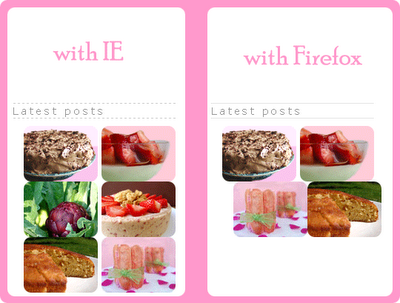
The lastest posts icons look good with IE, but they are all messed up when viewing with Firefox.
Click HERE to see screen captures.
Any ideas?
Plus: it seem i can't make more space between the icons. I tried with 'margin' with 'br'; but nothing seems to work.
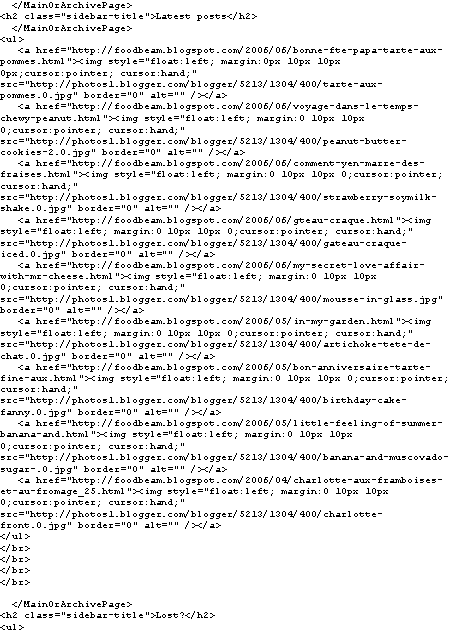
Here is the html codes for that part (click HERE).
I'd be happy if someone could give me a hand.
Thanx
Fanny
UPDATE: problem almost solved -- i finally removed the [li] tags at the beginning of each picture html code and if you want to see what i get you can go here.
BUT there is still something i've got to fix.
And the new codes HERE
UPDATE 2 - thanx to Jack's brain, everything's now back to normal, so thank you!
This Post was written by fanny from FOODBEAM




Subscribe to:
Post Comments (Atom)
7 comments:
Remove the "FLOAT: right" style from each second image (cheese, happy b-day, and framboises) and that should fix the problem and get the spacing the way you want it.
If you remove the "float:left" from all but the first image then your line should return to its normal position.
Thank you so much Jack's Brain; as you can see im not an html expert at all.
Always doing the same mistake.
I'll try en tell you
Fanny
This is a great article, Thanks for giving me this information. Keep posting psd to html5
The Space Between Us movie free online
Hmm it seems appears looks like your site website blog ate my first comment(it was extremely super long)so I guess I'll just sum it up what I submitted had written wrote and say,I'm thoroughly enjoying your blog.I as well too am an aspiring blog blogger writer but I'm still new to the whole thing everything.Do you have any helpful hints recommendations tips and hints points suggestions tips for inexperienced first-time rookie novice beginner newbie blog writers?I'd certainly definitely genuinely really appreciate it.
watch The Space Between Us movie for free
Pretty Very great nice post.I simply just stumbled upon your blog weblog and wanted wished to mention to say that I have I've really truly enjoyed loved browsing surfing around your blog weblog posts.In any case After all I'll I will be subscribing for your on your in your to your feed rss feed and I am hoping I hope I'm hoping you write again once more soon very soon!
watch The Space Between Us movie for free
Post a Comment